Artificial intelligence is moving beyond simple conversations.
For years, businesses mainly used AI chatbots to answer customer questions, generate content, summarize information and provide basic assistance. In 2026, a new category of AI is gaining momentum: AI agents.
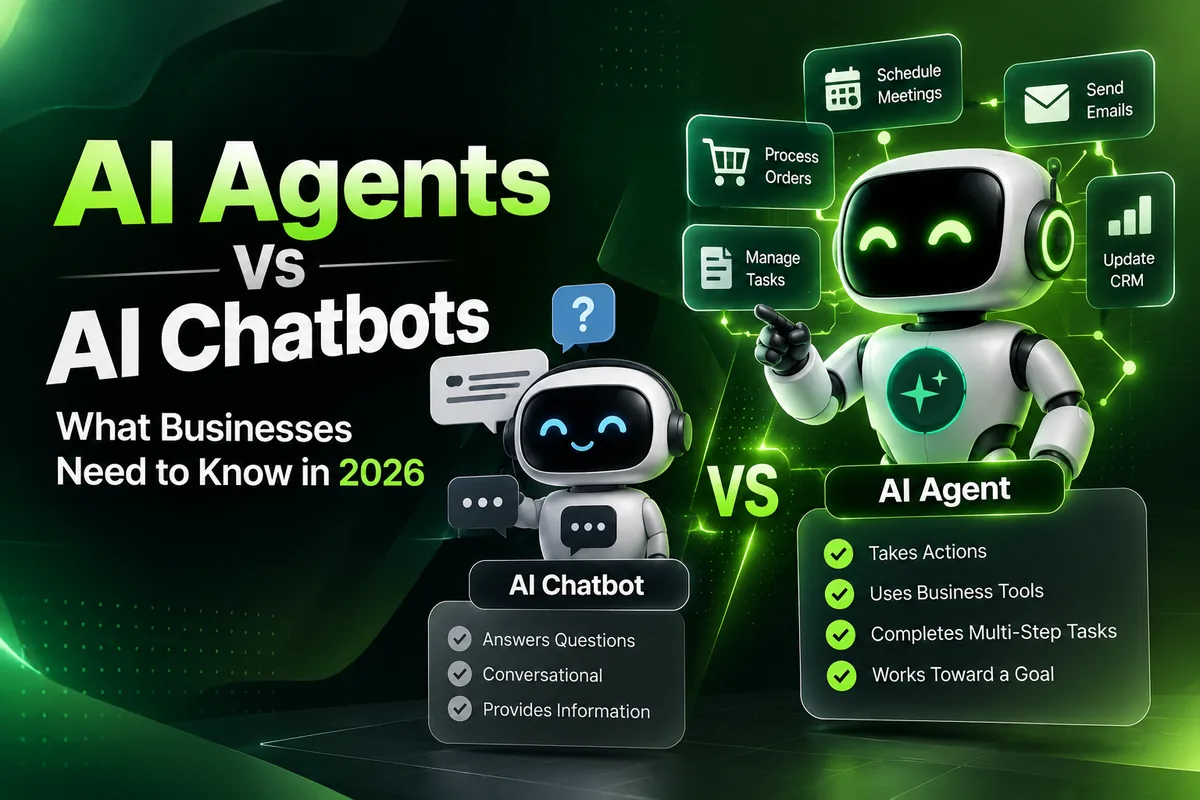
The key difference is simple: a chatbot mainly responds to you. An AI agent can be designed to take actions on your behalf.
This shift from “asking AI” to “delegating work to AI” is becoming increasingly important for businesses. Agent-style workflows are spreading beyond software development into sales, marketing, recruiting, legal work and operations.
So what exactly is the difference between an AI chatbot and an AI agent, and which one does your business actually need? Let’s break it down.
What is an AI chatbot?
An AI chatbot is a conversational software system that communicates with users through text or voice. It can understand questions, generate responses, provide information and help users with specific tasks.
For example, an eCommerce business could use a chatbot to answer:
- “Where is my order?”
- “What is your return policy?”
- “Which size should I buy?”
- “Do you ship internationally?”
- “What payment methods do you accept?”
A chatbot can dramatically reduce repetitive customer-support questions and provide assistance around the clock. However, a traditional chatbot generally waits for a user to interact with it: the user asks a question, and the AI responds.
What is an AI agent?
An AI agent is designed to go further. Instead of simply generating an answer, an agent can use tools, access information, follow instructions, make decisions within defined boundaries and perform multiple steps to accomplish a goal.
Imagine a customer says: “I want to return my order.” A basic chatbot might explain the return policy. An AI agent could:
- Identify the customer’s order.
- Check whether it qualifies for a return.
- Retrieve the relevant order information.
- Create a return request.
- Generate the required instructions.
- Update the CRM.
- Notify the appropriate team.
- Ask for human approval if required.
The exact capabilities depend on how the agent is built and which systems it is allowed to access. Agentic AI works with context and tools to complete longer, multi-step tasks, rather than simply responding to individual prompts. That is why AI agents are becoming so interesting to businesses.
AI chatbot vs AI agent: what’s the difference?
The easiest way to understand the difference is to look at the role each system plays.
| Feature | AI Chatbot | AI Agent |
|---|---|---|
| Answers questions | Yes | Yes |
| Conversational interaction | Yes | Yes |
| Generates content | Yes | Yes |
| Uses business data | Sometimes | Yes, when integrated |
| Uses external tools | Limited | Yes |
| Performs multi-step tasks | Limited | Yes |
| Takes actions | Usually limited | Yes, within permissions |
| Works toward a goal | Limited | Yes |
| Can connect multiple systems | Sometimes | Yes |
| Human approval | Optional | Often useful for sensitive actions |
| Automation potential | Medium | High |
An AI agent isn’t simply “a better chatbot”. They are different approaches to using AI. A chatbot is centered on conversation. An agent is centered on completing a task or achieving a defined outcome.
How does an AI agent work?
An AI agent typically combines five components.
1. AI model
The AI model provides reasoning and language capabilities. It helps understand the user’s request and decide what needs to happen next.
2. Business context
The agent needs relevant information about the business, such as:
- Product information
- Customer records
- Company policies
- Pricing
- FAQs
- Order information
- Internal documents
- CRM data
3. Tools and integrations
This is where agents become significantly more useful. An agent can connect with:
- Shopify
- WooCommerce
- WordPress
- CRM systems
- Google Sheets
- Databases
- APIs
- Accounting systems
- Helpdesk platforms
- Internal software
4. Workflow logic
The agent needs rules that determine what it should do. For example: customer asks for a refund → check the order → check refund eligibility → prepare the refund → request approval → process the refund.
5. Permissions and human oversight
Not every action should happen automatically. A business might allow an AI agent to draft a refund but require a person to approve refunds above $500. This creates a balance between automation and control.
Why are AI agents becoming important in 2026?
AI adoption is moving beyond experimentation. Large organizations in particular are moving from pilots to running AI agents in day-to-day work, and agent use is growing across knowledge-work functions such as legal, sales, recruiting and marketing.
That doesn’t mean every business needs an AI agent. It does show that businesses are increasingly exploring AI systems that can execute work rather than simply generate responses.
AI agents for business: real-world use cases
1. Customer support agent
A support agent can take on repetitive support processes. A customer asks about an order; the agent finds the order, checks the shipping status, responds and updates the support system if needed. For more complicated situations, it escalates the conversation to a person.
2. Sales agent
A sales agent can help sales teams by:
- Qualifying leads
- Collecting customer information
- Answering product questions
- Preparing meeting information
- Updating CRM records
- Drafting follow-up emails
- Identifying potential opportunities
3. Marketing agent
Marketing teams can use agents for repetitive research and execution: research competitors → analyze content → identify opportunities → prepare content ideas → create drafts → send for approval. The marketing team stays responsible for strategy and final approval.
4. eCommerce agent
For Shopify and other eCommerce businesses, AI agents can help with:
- Product information
- Customer support
- Order tracking
- Product recommendations
- Returns
- Inventory workflows
- Customer segmentation
- Review analysis
- Marketing workflows
An agent connected to the store and CRM works with real business data rather than relying only on a general AI model.
5. WhatsApp AI agent
Many businesses already talk to customers on WhatsApp. An AI-powered WhatsApp agent can handle a workflow like this: a customer asks about a product; the agent shares product information, checks availability, answers questions, collects the customer’s details and creates a lead. For businesses with lots of repetitive WhatsApp conversations, this becomes a useful automation layer.
6. Internal operations agent
AI agents aren’t only for customers; they can help employees too. An employee asks, “Prepare this week’s sales report.” The agent collects the data, analyzes the results, prepares the report and sends it to the right team, which cuts repetitive admin work.
AI chatbots are still useful
AI agents don’t make chatbots obsolete. A chatbot may be all you need for:
- FAQ automation
- Basic customer support
- Website assistance
- Product information
- Simple lead collection
- Content generation
- Basic conversational experiences
For a small business with straightforward requirements, building a complex agent may add unnecessary cost and complexity. The goal isn’t to use the most advanced AI technology. It is to solve the right business problem.
When should a business use an AI agent?
Consider an AI agent when your workflow involves:
Repetitive tasks
If employees repeatedly perform the same sequence of actions, it may be a good automation candidate.
Multiple systems
If people constantly move information between a CRM, email, spreadsheets, your website and other tools, an agent can connect the workflow.
Multiple steps
If a task needs several actions instead of a single response, an agent is more useful than a basic chatbot.
Large volumes of requests
Businesses receiving hundreds or thousands of customer or internal requests can automate parts of that workload.
Clear business rules
Agents work best when you can clearly define:
- What the agent can do
- What it cannot do
- What information it can access
- When it should ask for approval
- When it should escalate to a person
AI agents need guardrails
Automation should not mean giving AI unlimited access to your business. This is one of the most important considerations when implementing AI agents. Businesses should define:
- Access permissions
- Data privacy rules
- API permissions
- Human approval steps
- Error handling
- Logging
- Monitoring
- Escalation procedures
- Security controls
For example, an agent might be allowed to create a draft invoice but not send it or approve a payment automatically. The level of autonomy should match the risk of the task. Running agents reliably in production also takes more than connecting an AI model to a workflow: you need testing, deployment and ongoing monitoring as business conditions change.
How much does it cost to build an AI agent?
There is no single price for an AI agent. The cost depends on:
- Number of workflows
- AI model
- API usage
- Number of integrations
- CRM integration
- WhatsApp integration
- Database requirements
- Authentication
- Admin dashboard
- Human approval workflows
- Security requirements
- Hosting
- Monitoring
- Maintenance
A simple AI workflow can be relatively straightforward. A production-grade business agent connected to multiple systems needs significantly more planning, development, testing and ongoing maintenance.
The right question isn’t “How much does an AI agent cost?” A better one is: “What business process are we trying to automate, and what will it save or improve?”
AI agent vs chatbot: which one does your business need?
Use a chatbot if your main requirement is: “Answer my customers’ questions.” Consider an AI agent if your requirement is: “Complete this business task for me.”
For example, a customer asks:
“What is your return policy?”
An AI chatbot replies:
“Our return policy allows eligible products to be returned within 30 days.”
An AI agent replies:
“I’ll check your order, verify whether it qualifies, create the return request and send you the next steps.”
The difference is the level of action.
The future of business AI is not just conversation
The biggest shift in AI isn’t that chatbots are becoming smarter. It is that AI is increasingly connected to the systems where businesses actually operate:
AI + data + tools + workflows + permissions = business automation
That makes it possible for AI systems to take part in business processes, not just provide information. For businesses, the next AI opportunity may not be another chatbot on the website. It may be an AI system working behind the scenes.
How businesses can start with AI agents
You don’t need to automate your entire company on day one. Start with one repetitive workflow.
Step 1: Identify a repetitive process
Look for tasks employees perform every day or every week.
Step 2: Measure the current process
Understand:
- How many times it happens
- How long it takes
- How many employees are involved
- Where errors happen
Step 3: Define the AI’s responsibilities
Clearly decide what the agent should and shouldn’t do.
Step 4: Connect the required systems
This could include your CRM, Shopify store, WhatsApp, email, database or internal software.
Step 5: Add human approval
Keep people involved where decisions have financial, legal, security or customer-impact consequences.
Step 6: Test before scaling
Start with a controlled workflow and monitor the results.
Step 7: Expand gradually
Once the first workflow works reliably, move on to additional processes.
Final thoughts
AI chatbots and AI agents serve different purposes. Chatbots are useful for conversation, information, support and simple automation. AI agents are designed for more complex workflows, where AI can use tools, access information, perform multiple steps and work toward a defined outcome.
In 2026, more businesses are experimenting with agentic AI and scaling it, but that doesn’t mean every business needs a fully autonomous AI workforce. The practical opportunity is to identify specific workflows where AI can create measurable value while keeping appropriate human oversight.
The future isn’t simply about asking AI better questions. It’s about giving AI the right context, tools, permissions and workflows to help your business get work done.
At Shreeji Software, we build AI-powered business solutions, including AI agents, AI chatbots, n8n automation, WhatsApp automation, CRM automation, API integrations and custom software. See our AI automation services, or tell us about a process that takes too much of your team’s time.